Import an Existing Assignment
When you create a new assignment, you can check if there is any information already entered for the Claim-Suffix number. If the Claim-Suffix number already exists in the system, you can import the existing information. This saves you from having to re-enter all the data.
How to
 Import an Existing Assignment
-
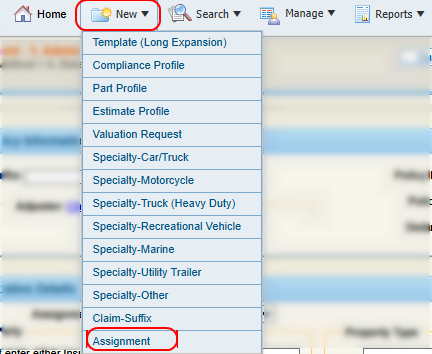
On the New menu in the navigation bar, select Assignment.
- On the New Assignment page, enter the Claim-Suffix number.
- Select Import.
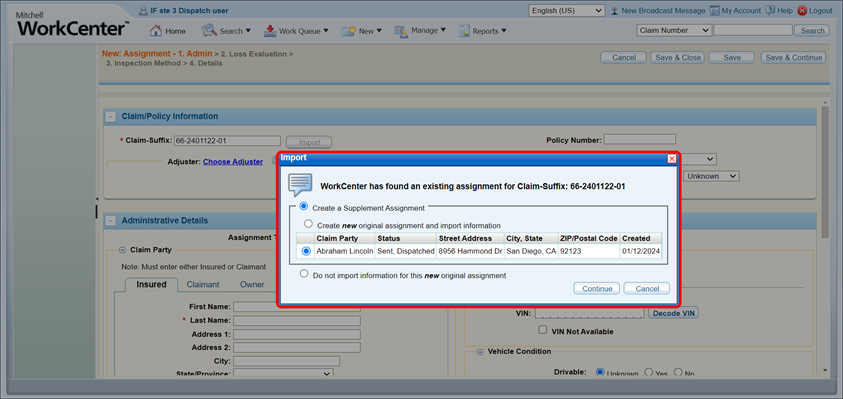
- In the Import window, view the existing claim-suffix(es).
- Select the desired claim and one of the following options:
- Select Create a Supplement Assignment to create an additional supplement assignment to the claim-suffix using the imported information.
- Select Create new original assignment and import information to automatically populate fields with existing claim-suffix information. This reduces the information you have to enter manually when creating the new assignment.
- Select Do not import information for this new original assignment if you do not want to import existing information on the claim-suffix.
- Select Continue to import the desired information and continue filling out the assignment as necessary.
Related topics
