Assign Assignments from the Scheduling Board
Use the Scheduling Board to assign work using one of the following methods:
-
Manual assignment: Drag and drop assignments directly on the Time View tab.
-
Automatic assignment: Use the Assign To and Auto-Assign functions to intelligently schedule assignments based on the options configured in the Scheduling Engine.
Note: The Scheduling Engine is configured during system setup.
How to
 Use Drag and Drop to Assign Assignments
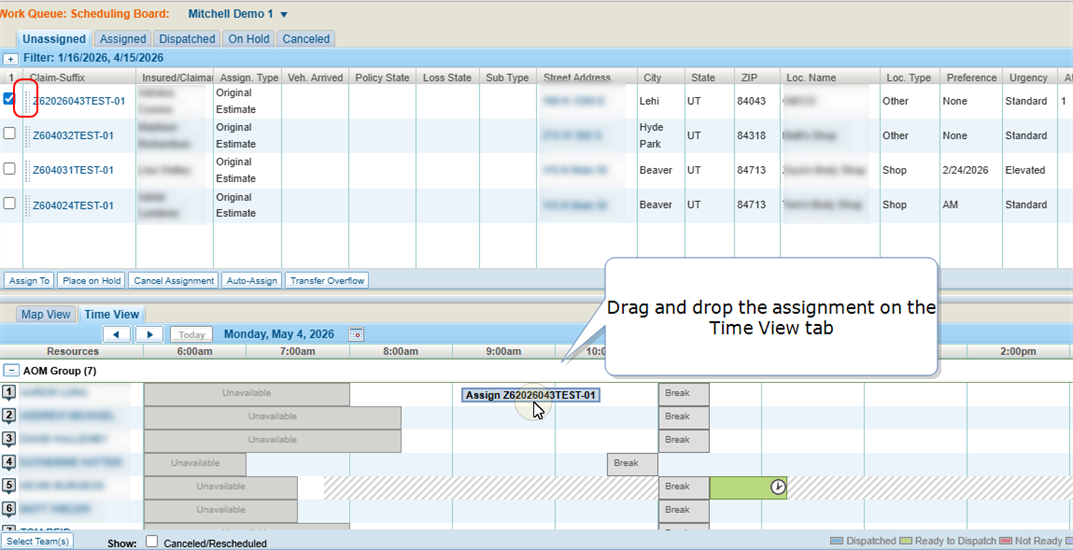
Use drag-and-drop scheduling to manually assign work to a specific appraiser at a specific time.
Note: The assignment is scheduled exactly where it is placed on the Time View tab, regardless of any overlap or scheduling conflicts.
-
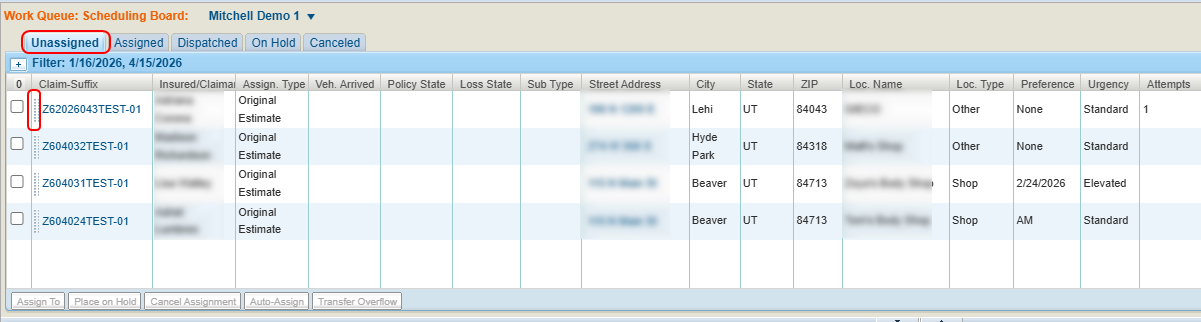
On the Scheduling Board, select the Unassigned tab.
-
Select the lines next to the Claim Suffix number of the desired assignment.
-
Drag the assignment to the desired location on the Time View tab.
Use "Assign To" to Assign Assignments
Use the Assign To function to assign work to a specific appraiser while allowing the system to automatically determine the optimal placement for the assignment within the appraiser’s schedule.
-
On the Scheduling Board, select the Unassigned tab.
-
Select the check box(es) next to the desired assignment(s).

-
Select Assign To.
-
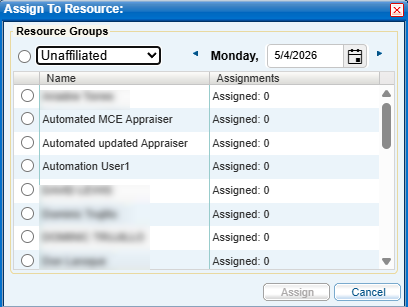
In the Assign to Resource window, select a Resource Group from the drop down list to view all appraisal resources in that group.
-
Enter a date or select
 to select a date from the calendar.
 -
Do one of the following:
-
Select a Resource Group to assign the assignment to the group rather than a specific individual.
-
Select an individual resource's name to assign the assignment.
-
-
Select Assign.
-
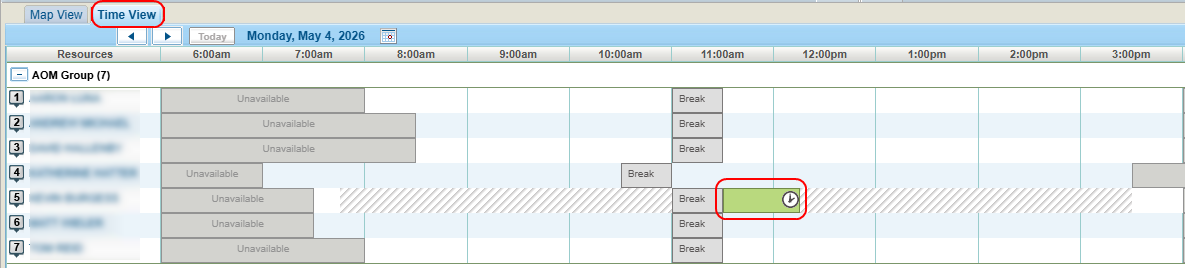
View the Time View tab to see when the assignment was scheduled.
Use Auto-Assign to Assign Assignments
Use the Auto-Assign function to allow the system to automatically determine the optimal appraisal resource and scheduled time for the assignment.
-
On the Scheduling Board, select the Unassigned tab.
-
Select the check box(es) next to the desired assignment(s).

-
Select Auto-Assign.
-
View the Time View tab to see to whom the assignment was assigned and when it was scheduled.
Reference
Assignment Tab Column Components
| Name | Description |
|---|---|
| Claim-Suffix | The claim number including its suffix. Select the number to View Assignment Details. |
| Insured/Claimant / Assign. Type / Street Address / City / State / ZIP / Loc. Name / Loc. Type |
General information taken from the assignment. The Street Address is a link to the assignment on the Map View tab. |
| Status | The dispatch status of the assignment: Ready, Not Ready. You can assign an assignment that has a Not Ready status as long as it has a valid address. Once it is assigned, its status changes to Ready. |
| Assigned to |
The appraisal resource for the assignment. |
| Attempts | The number of times an assignment has been dispatched. |
| Scheduled | The date and time the appointment is scheduled. Select to view the assignment on the Time View tab. |
Related topics
