Admin Tab
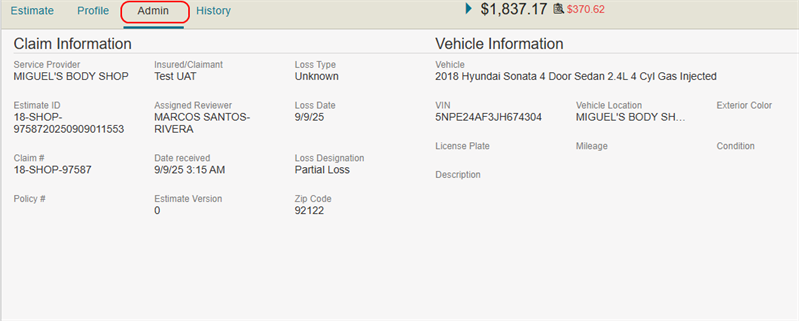
The Admin Tab shows the claim and vehicle information for the estimate. The claim and vehicle information are found in the Job Overview in Mitchell Connect.
How to
 View Administrative Details
The Administrative Details section shows the claim and vehicle information for the estimate.
- On the Review Estimate page, select the Admin tab.
Reference
Claim Information Field Descriptions
| Name | Description |
|---|---|
| Service Provider | The shop/resource providing service to the vehicle involved in the claim. |
| Estimate ID | The estimate identification number. |
| Claim # | The claim number. |
| Policy # | The policy number. |
| Insured/Claimant | The name of the claimant/insured party. |
| Assigned Reviewer | The reviewer assigned to the estimate. |
| Date received | The date the estimate was received in WorkCenter. |
| Estimate Version | The version number of the estimate (0 if it is the first version). |
| Loss Type | The type of loss (e.g., collision, fire, etc.) from the list. |
| Loss Date | The date of the loss. |
| Loss Designation |
The designation of the loss (e.g., Total Loss or Partial). |
Vehicle Information Descriptions
| Name | Description |
|---|---|
| VIN | The Vehicle Identification Number. |
| License Plate |
The vehicle license plate number and the state/province where the vehicle is registered. |
| Exterior Color |
The color of the vehicle. |
| Mileage (in miles) | The odometer reading. |
| Condition | The condition of the vehicle. |
| Location | The vehicle's location. |
Related topics
